> ## Documentation Index
> Fetch the complete documentation index at: https://docs.cello.so/llms.txt
> Use this file to discover all available pages before exploring further.
# Cello for iOS
The Cello SDK for iOS enables you to add a referral program into your iOS app. With a plug-n-play mobile component, your users can easily share their invite link with their friends and network using mobile sharing options convenient for them, receive rewards and get paid out.
## Installation
A basic installation takes around 15 minutes but will take a little longer if you want to customize the way the Cello Referral Component is launched.
**Compatibility**
Cello for iOS is compatible with iOS 15 and up.
### SDK size
The size of Cello for iOS varies depending on your app’s configuration. For most installations, it’s around 3 MB in size.
## Setup
Install Cello to see and give your users the option to spread the word from your iOS app. The Cello for iOS library supports iOS **15+** and requires **Xcode 14** to build.
### Install Cello
#### Option 1: CocoaPods
Using the [latest version of Cocoapods](https://github.com/CocoaPods/CocoaPods/releases/latest), add CelloSDK to your Podfile and run `pod install`
```ruby theme={null}
target :YourTargetName do
pod 'CelloSDK'
end
```
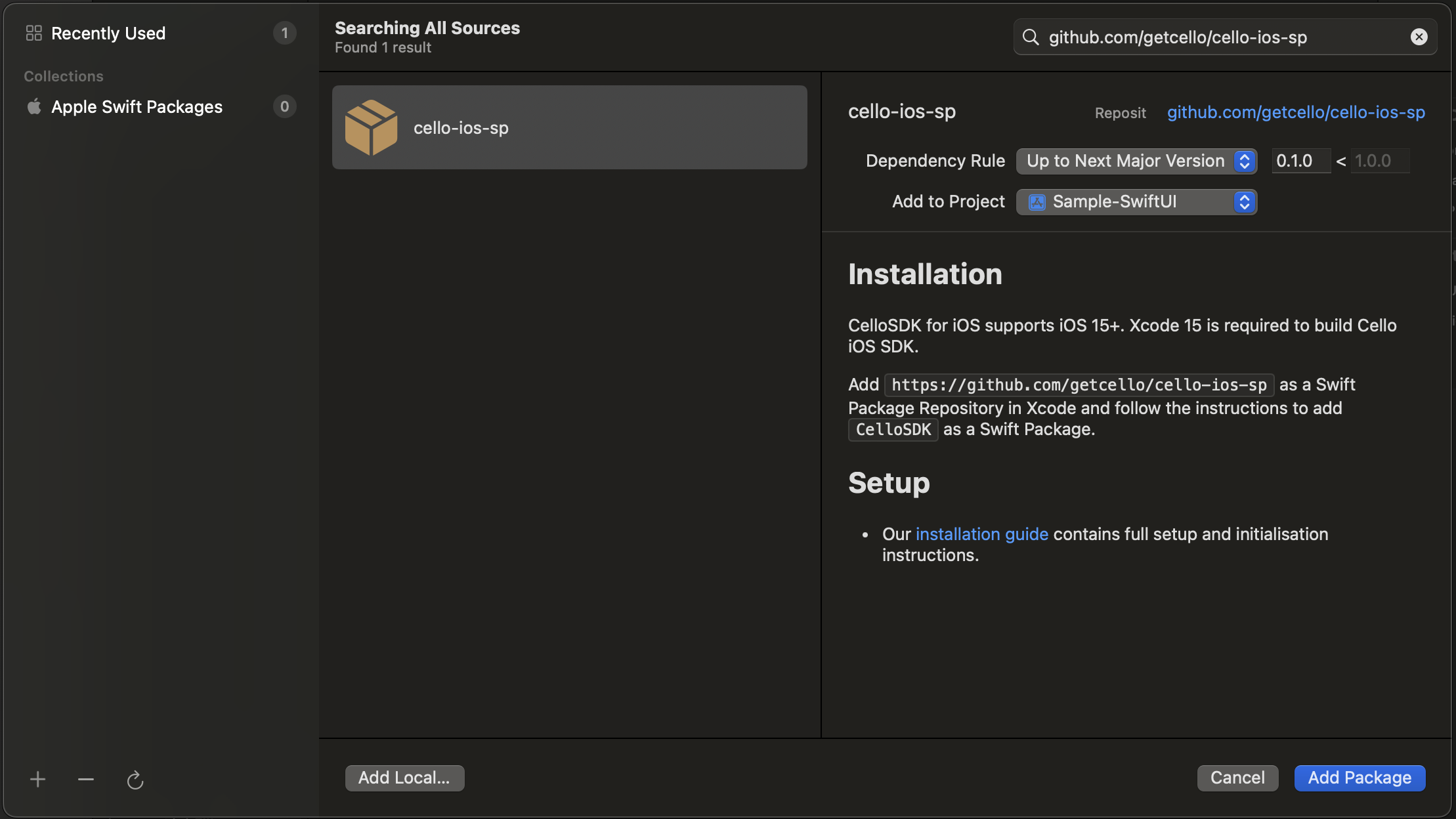
#### Option 2: Swift Package Manager
Add [**https://github.com/getcello/cello-ios-sp**](https://github.com/getcello/cello-ios-sp) as a Swift Package Repository in Xcode and follow the instructions to add CelloSDK as a Swift Package.
 #### Option 3: Install Cello manually
1. Download Cello for iOS and extract the zip. (👉 [**Cello iOS zip download**](https://github.com/getcello/cello-ios-sp/releases))
2. Drag `CelloSDK.xcframework` into your project. Make sure **Copy items if needed** is selected and click Finish.
3. In the target settings for your app, set the `CelloSDK.xcframework` to **Embed & Sign** in the **Frameworks, Libraries, and Embedded Content** section of the **General** tab.
### Choose an Environment
In your Cello SDK setup, you have the flexibility to select the environment in which your application will run. This feature is especially useful for different stages of development, such as testing in a development or staging environment before going live in production. The available environments are:
Available environments:
* `prod` (Production)
* `sandbox` (Sandbox)
*`Default environment: prod`*
#### Configuration Steps
* Open your iOS project in Xcode.
* Navigate to the `Info.plist` file.
* Add a new key-value pair:
```xml theme={null}
CELLO_ENV
prod
```
* To switch to sandbox, change the string value to `sandbox`.
* Save your changes. The next build will use the selected environment.
Using this setup, the Cello SDK on iOS can adapt to the chosen environment, allowing a smoother and more controlled development and testing process.
## Initialize Cello
You’ll need your **product ID** and a user-specific **token** (similar to [the web-based Referral component flow](https://docs.cello.so/docs/user-authentication)):
```swift theme={null}
import CelloSDK
Cello.initialize(for: "YOUR_PRODUCT_ID", with: token) { result in
switch result {
case .success(let configuration):
print("Initialization successful with config:", configuration)
case .failure(let error):
print("Initialization failed with error:", error)
}
}
```
## Customize the Cello Referral Component
The Cello SDK allows for various levels of customization to better fit into your app's design and flow. One of the main components you might want to customize is the [**Referral component**](https://docs.cello.so/docs/component-overview)
### Choose your launcher
* **Default launcher**: Use `Cello.showFab()` to present a pre-styled Floating Action Button (FAB).
```swift theme={null}
import CelloSDK
Cello.showFab()
```
* **Custom launcher**: Use any UI element (button, menu item, gesture) and call `Cello.openWidget()` when you want to open it.
```swift theme={null}
import CelloSDK
class YourViewController: UIViewController {
override func viewDidLoad() {
super.viewDidLoad()
let myButton = UIButton(type: .system)
myButton.setTitle("Open Referral", for: .normal)
myButton.addTarget(self, action: #selector(didTapMyButton), for: .touchUpInside)
// Add 'myButton' to your view
}
@objc func didTapMyButton() {
Cello.openWidget()
}
}
```
### Advanced: Custom Callbacks
For even more control, you can implement your own delegate conforming to the `CelloDelegate` protocol. This allows you to get callbacks for significant events in the Referral component.
```swift theme={null}
class YourViewController: UIViewController, CelloDelegate {
func celloWidgetDidOpen() {
print("Cello widget opened")
}
func celloWidgetDidClose() {
print("Cello widget closed")
}
override func viewDidLoad() {
super.viewDidLoad()
Cello.delegate = self
}
}
```
## iOS API
### Cello.initialize()
Initializes the Cello referral component.
| Name | Type | Description | Required |
| - | - | - | - |
| productId | string | Identifier of the product your users will refer. Found in your Cello Portal. | Yes |
| token | string | Access token generated for the given user. | Yes |
| productUserDetails | Cello.productUserDetails | Product User details | No |
| language | string | Initial language of the widget | No |
| themeMode | string | Initial theme mode: `"light"` or `"dark"` | No |
| completion | callback | Receives success or failure with configuration or error. | |
```swift theme={null}
import CelloSDK
let productUserDetails = CelloSDK.ProductUserDetails(
firstName: "John",
lastName: "Doe",
fullName: "John Doe",
email: "john.doe@example.com"
)
Cello.initialize(for: "dev.cello.so", with: token, productUserDetails: productUserDetails, language: 'de', themeMode: 'light') { result in
switch result {
case .success(let configuration):
print("Initialization successful with config:", configuration)
case .failure(let error):
print("Initialization failed with error:", error)
}
}
```
### Cello.showFab()
Shows the Floating action button or bookmark that launches the Referral Component
```swift theme={null}
import CelloSDK
Cello.showFab()
```
### Cello.hideFab()
Hides the Floating action button or bookmark that launches the Referral Component
```swift theme={null}
import CelloSDK
Cello.hideFab()
```
### Cello.openWidget()
Opens the referral component.
```swift theme={null}
import CelloSDK
Cello.openWidget()
```
### Cello.hideWidget()
Hides the referral component.
```swift theme={null}
import CelloSDK
Cello.hideWidget()
```
### Cello.getActiveUcc()
A method to get an active `ucc` and invite link for the currently logged in user.
```swift theme={null}
import CelloSDK
let result = Cello.getActiveUcc()
// ["ucc": "...", "link": "..."] or nil before initialization
```
### Cello.getConfiguration()
Returns the state of the initialised SDK, or `nil` if the SDK is not ready yet. `nil` means "not initialised", not "this user has no referral data".
Available from 0.15.0.
```swift theme={null}
import CelloSDK
if let configuration = Cello.getConfiguration() {
print(configuration.ucc as Any, configuration.shareLink as Any)
print(configuration.views, configuration.unreadViewsCount)
}
```
Exposes `productId`, `referrerId`, `campaignId`, `ucc`, `shareLink`, `productName`, `language`, `supportedLanguages`, `themeMode`, `platform`, `sdkVersion`, `tokenTTL`, `totalEarnedRewards`, `views`, `unreadViewsCount`, `hasPaymentDetails`, `onboardingShown`, `isUserBlocked`, `isWidgetUnavailable`, `showFullWidget`, `showEnhancedView`, `isTablet` and `campaignConfig`.
`tokenTTL` is `-1` when token expiry checking is disabled for the product, which is the default.
Use `asDictionary()` if you need a serialisable form, for example to pass across a bridge.
Some fields are `nil` for blocked users and when the referral component is unavailable.
## `getCampaignConfig()`
Returns campaign config values for the currently logged-in user.
```swift theme={null}
import CelloSDK
let result = Cello.getCampaignConfig()
```
### Returns
The campaign config object:
Primary currency code
Percentage of attributed new revenue that will be paid as a reward
Maximum reward that can be earned per referral
Additional reward for signups to encourage more sharing
Additional reward for purchases to encourage more sharing
How long new users get a discount
The discount new users get
### Cello.changeLanguage()
A method to change the language of the Referral component at runtime without re-initialising it.
```swift theme={null}
import CelloSDK
Cello.changeLanguage(to: .de)
```
### Cello.setThemeMode()
A method to change the theme mode of the Referral component at runtime without re-initialising it.
```swift theme={null}
import CelloSDK
Cello.setThemeMode(to: "dark")
```
**Parameters:**
* `themeMode` (*String*): The theme mode to set. Valid values are `"light"` or `"dark"`.
**Availability:** iOS 14.0+
### Cello.shutdown()
Shuts down connection to Cello and unmounts the component
```swift theme={null}
import CelloSDK
Cello.shutdown()
```
## Error Handling
When using CelloSDK, you may encounter errors during initialization or other operations. Errors are returned in the format:
```
The operation couldn't be completed. (CelloSDK.APIError error N.)
```
Where `N` is a numeric error code (0-6) that identifies the specific error type.
### Error Codes Reference
#### Error 0: Invalid URL
**What it means:** The SDK attempted to create a request with an invalid or malformed URL.
**Common causes:**
* Missing or empty product ID
* Malformed base URL in SDK configuration
* Invalid characters in URL parameters
***
#### Error 1: Unauthorized
**What it means:** The authentication token is invalid, expired, or the user is not authorized to access the widget.
**Common causes:**
* Expired JWT token
* Invalid token signature
* Token generated for a different product ID
* User permissions revoked
* Initializing for wrong environment
***
#### Error 2: Request Failed
**What it means:** The network request failed due to connectivity issues or server errors.
**Error code meanings:**
* `-1`: Network connectivity error (no internet, timeout)
* `400-499`: Client errors (bad request, not found)
* `500-599`: Server errors
**Common causes:**
* No internet connection
* Slow or unstable network
* Server maintenance or downtime
* Firewall or proxy blocking requests
***
#### Error 3: Invalid Response Type
**What it means:** The server response was not in the expected HTTP format.
**Common causes:**
* Network proxy modifying responses
* Server misconfiguration
* Non-HTTP protocol response
***
#### Error 4: No Data Received
**What it means:** The server returned a successful response (HTTP 200-299) but with no data in the response body.
**Common causes:**
* Server returning empty response
* Network issue truncating the response
* Incorrect API endpoint or version
***
#### Error 5: JSON Parsing Error
**What it means:** The SDK received data from the server but couldn't parse it as valid JSON.
**Common causes:**
* Server returned HTML error page instead of JSON
* Malformed or incomplete response
* API version mismatch
***
#### Error 6: Invalid State
**What it means:** The SDK is in an invalid state or required parameters are missing.
**Specific messages:**
* "Product ID cannot be empty"
* "Token cannot be empty"
* "Product ID not set"
* "Configuration not initialized"
**Common causes:**
* Empty product ID or token during initialization
* Calling SDK methods before initialization completes
***
### Initialization State Errors
If you call SDK methods before initialization, you'll see console warnings:
* `"Error: showFab() called before initialization."`
* `"Error: hideFab() called before initialization."`
* `"Error: openWidget() called before initialization."`
* `"Error: hideWidget() called before initialization."`
* `"Error: shutdown() called before initialization."`
* `"Error: getActiveUcc() called before initialization."`
* `"Error: getCampaignConfig() called before initialization."`
* `"Error: changeLanguage() called before initialization."`
* `"Error: setThemeMode() called before initialization."`
**Solution:** Always wait for initialization to complete before calling other SDK methods.
***
### Error Handling Best Practices
**1. Validate parameters before initialization:**
```swift theme={null}
guard !productId.trimmingCharacters(in: .whitespaces).isEmpty else {
print("Error: Product ID is required")
return
}
guard !token.trimmingCharacters(in: .whitespaces).isEmpty else {
print("Error: Token is required")
return
}
Cello.initialize(for: productId, with: token) { result in
// Handle result
}
```
**2. Track initialization state:**
```swift theme={null}
class CelloManager {
private var isInitialized = false
func initialize(productId: String, token: String) {
Cello.initialize(for: productId, with: token) { [weak self] result in
if case .success = result {
self?.isInitialized = true
}
}
}
func showReferral() {
guard isInitialized else {
print("SDK not initialized yet")
return
}
Cello.openWidget()
}
}
```
This documentation is built and hosted on [Mintlify](https://mintlify.com), a developer documentation platform.
#### Option 3: Install Cello manually
1. Download Cello for iOS and extract the zip. (👉 [**Cello iOS zip download**](https://github.com/getcello/cello-ios-sp/releases))
2. Drag `CelloSDK.xcframework` into your project. Make sure **Copy items if needed** is selected and click Finish.
3. In the target settings for your app, set the `CelloSDK.xcframework` to **Embed & Sign** in the **Frameworks, Libraries, and Embedded Content** section of the **General** tab.
### Choose an Environment
In your Cello SDK setup, you have the flexibility to select the environment in which your application will run. This feature is especially useful for different stages of development, such as testing in a development or staging environment before going live in production. The available environments are:
Available environments:
* `prod` (Production)
* `sandbox` (Sandbox)
*`Default environment: prod`*
#### Configuration Steps
* Open your iOS project in Xcode.
* Navigate to the `Info.plist` file.
* Add a new key-value pair:
```xml theme={null}
CELLO_ENV
prod
```
* To switch to sandbox, change the string value to `sandbox`.
* Save your changes. The next build will use the selected environment.
Using this setup, the Cello SDK on iOS can adapt to the chosen environment, allowing a smoother and more controlled development and testing process.
## Initialize Cello
You’ll need your **product ID** and a user-specific **token** (similar to [the web-based Referral component flow](https://docs.cello.so/docs/user-authentication)):
```swift theme={null}
import CelloSDK
Cello.initialize(for: "YOUR_PRODUCT_ID", with: token) { result in
switch result {
case .success(let configuration):
print("Initialization successful with config:", configuration)
case .failure(let error):
print("Initialization failed with error:", error)
}
}
```
## Customize the Cello Referral Component
The Cello SDK allows for various levels of customization to better fit into your app's design and flow. One of the main components you might want to customize is the [**Referral component**](https://docs.cello.so/docs/component-overview)
### Choose your launcher
* **Default launcher**: Use `Cello.showFab()` to present a pre-styled Floating Action Button (FAB).
```swift theme={null}
import CelloSDK
Cello.showFab()
```
* **Custom launcher**: Use any UI element (button, menu item, gesture) and call `Cello.openWidget()` when you want to open it.
```swift theme={null}
import CelloSDK
class YourViewController: UIViewController {
override func viewDidLoad() {
super.viewDidLoad()
let myButton = UIButton(type: .system)
myButton.setTitle("Open Referral", for: .normal)
myButton.addTarget(self, action: #selector(didTapMyButton), for: .touchUpInside)
// Add 'myButton' to your view
}
@objc func didTapMyButton() {
Cello.openWidget()
}
}
```
### Advanced: Custom Callbacks
For even more control, you can implement your own delegate conforming to the `CelloDelegate` protocol. This allows you to get callbacks for significant events in the Referral component.
```swift theme={null}
class YourViewController: UIViewController, CelloDelegate {
func celloWidgetDidOpen() {
print("Cello widget opened")
}
func celloWidgetDidClose() {
print("Cello widget closed")
}
override func viewDidLoad() {
super.viewDidLoad()
Cello.delegate = self
}
}
```
## iOS API
### Cello.initialize()
Initializes the Cello referral component.
| Name | Type | Description | Required |
| - | - | - | - |
| productId | string | Identifier of the product your users will refer. Found in your Cello Portal. | Yes |
| token | string | Access token generated for the given user. | Yes |
| productUserDetails | Cello.productUserDetails | Product User details | No |
| language | string | Initial language of the widget | No |
| themeMode | string | Initial theme mode: `"light"` or `"dark"` | No |
| completion | callback | Receives success or failure with configuration or error. | |
```swift theme={null}
import CelloSDK
let productUserDetails = CelloSDK.ProductUserDetails(
firstName: "John",
lastName: "Doe",
fullName: "John Doe",
email: "john.doe@example.com"
)
Cello.initialize(for: "dev.cello.so", with: token, productUserDetails: productUserDetails, language: 'de', themeMode: 'light') { result in
switch result {
case .success(let configuration):
print("Initialization successful with config:", configuration)
case .failure(let error):
print("Initialization failed with error:", error)
}
}
```
### Cello.showFab()
Shows the Floating action button or bookmark that launches the Referral Component
```swift theme={null}
import CelloSDK
Cello.showFab()
```
### Cello.hideFab()
Hides the Floating action button or bookmark that launches the Referral Component
```swift theme={null}
import CelloSDK
Cello.hideFab()
```
### Cello.openWidget()
Opens the referral component.
```swift theme={null}
import CelloSDK
Cello.openWidget()
```
### Cello.hideWidget()
Hides the referral component.
```swift theme={null}
import CelloSDK
Cello.hideWidget()
```
### Cello.getActiveUcc()
A method to get an active `ucc` and invite link for the currently logged in user.
```swift theme={null}
import CelloSDK
let result = Cello.getActiveUcc()
// ["ucc": "...", "link": "..."] or nil before initialization
```
### Cello.getConfiguration()
Returns the state of the initialised SDK, or `nil` if the SDK is not ready yet. `nil` means "not initialised", not "this user has no referral data".
Available from 0.15.0.
```swift theme={null}
import CelloSDK
if let configuration = Cello.getConfiguration() {
print(configuration.ucc as Any, configuration.shareLink as Any)
print(configuration.views, configuration.unreadViewsCount)
}
```
Exposes `productId`, `referrerId`, `campaignId`, `ucc`, `shareLink`, `productName`, `language`, `supportedLanguages`, `themeMode`, `platform`, `sdkVersion`, `tokenTTL`, `totalEarnedRewards`, `views`, `unreadViewsCount`, `hasPaymentDetails`, `onboardingShown`, `isUserBlocked`, `isWidgetUnavailable`, `showFullWidget`, `showEnhancedView`, `isTablet` and `campaignConfig`.
`tokenTTL` is `-1` when token expiry checking is disabled for the product, which is the default.
Use `asDictionary()` if you need a serialisable form, for example to pass across a bridge.
Some fields are `nil` for blocked users and when the referral component is unavailable.
## `getCampaignConfig()`
Returns campaign config values for the currently logged-in user.
```swift theme={null}
import CelloSDK
let result = Cello.getCampaignConfig()
```
### Returns
The campaign config object:
Primary currency code
Percentage of attributed new revenue that will be paid as a reward
Maximum reward that can be earned per referral
Additional reward for signups to encourage more sharing
Additional reward for purchases to encourage more sharing
How long new users get a discount
The discount new users get
### Cello.changeLanguage()
A method to change the language of the Referral component at runtime without re-initialising it.
```swift theme={null}
import CelloSDK
Cello.changeLanguage(to: .de)
```
### Cello.setThemeMode()
A method to change the theme mode of the Referral component at runtime without re-initialising it.
```swift theme={null}
import CelloSDK
Cello.setThemeMode(to: "dark")
```
**Parameters:**
* `themeMode` (*String*): The theme mode to set. Valid values are `"light"` or `"dark"`.
**Availability:** iOS 14.0+
### Cello.shutdown()
Shuts down connection to Cello and unmounts the component
```swift theme={null}
import CelloSDK
Cello.shutdown()
```
## Error Handling
When using CelloSDK, you may encounter errors during initialization or other operations. Errors are returned in the format:
```
The operation couldn't be completed. (CelloSDK.APIError error N.)
```
Where `N` is a numeric error code (0-6) that identifies the specific error type.
### Error Codes Reference
#### Error 0: Invalid URL
**What it means:** The SDK attempted to create a request with an invalid or malformed URL.
**Common causes:**
* Missing or empty product ID
* Malformed base URL in SDK configuration
* Invalid characters in URL parameters
***
#### Error 1: Unauthorized
**What it means:** The authentication token is invalid, expired, or the user is not authorized to access the widget.
**Common causes:**
* Expired JWT token
* Invalid token signature
* Token generated for a different product ID
* User permissions revoked
* Initializing for wrong environment
***
#### Error 2: Request Failed
**What it means:** The network request failed due to connectivity issues or server errors.
**Error code meanings:**
* `-1`: Network connectivity error (no internet, timeout)
* `400-499`: Client errors (bad request, not found)
* `500-599`: Server errors
**Common causes:**
* No internet connection
* Slow or unstable network
* Server maintenance or downtime
* Firewall or proxy blocking requests
***
#### Error 3: Invalid Response Type
**What it means:** The server response was not in the expected HTTP format.
**Common causes:**
* Network proxy modifying responses
* Server misconfiguration
* Non-HTTP protocol response
***
#### Error 4: No Data Received
**What it means:** The server returned a successful response (HTTP 200-299) but with no data in the response body.
**Common causes:**
* Server returning empty response
* Network issue truncating the response
* Incorrect API endpoint or version
***
#### Error 5: JSON Parsing Error
**What it means:** The SDK received data from the server but couldn't parse it as valid JSON.
**Common causes:**
* Server returned HTML error page instead of JSON
* Malformed or incomplete response
* API version mismatch
***
#### Error 6: Invalid State
**What it means:** The SDK is in an invalid state or required parameters are missing.
**Specific messages:**
* "Product ID cannot be empty"
* "Token cannot be empty"
* "Product ID not set"
* "Configuration not initialized"
**Common causes:**
* Empty product ID or token during initialization
* Calling SDK methods before initialization completes
***
### Initialization State Errors
If you call SDK methods before initialization, you'll see console warnings:
* `"Error: showFab() called before initialization."`
* `"Error: hideFab() called before initialization."`
* `"Error: openWidget() called before initialization."`
* `"Error: hideWidget() called before initialization."`
* `"Error: shutdown() called before initialization."`
* `"Error: getActiveUcc() called before initialization."`
* `"Error: getCampaignConfig() called before initialization."`
* `"Error: changeLanguage() called before initialization."`
* `"Error: setThemeMode() called before initialization."`
**Solution:** Always wait for initialization to complete before calling other SDK methods.
***
### Error Handling Best Practices
**1. Validate parameters before initialization:**
```swift theme={null}
guard !productId.trimmingCharacters(in: .whitespaces).isEmpty else {
print("Error: Product ID is required")
return
}
guard !token.trimmingCharacters(in: .whitespaces).isEmpty else {
print("Error: Token is required")
return
}
Cello.initialize(for: productId, with: token) { result in
// Handle result
}
```
**2. Track initialization state:**
```swift theme={null}
class CelloManager {
private var isInitialized = false
func initialize(productId: String, token: String) {
Cello.initialize(for: productId, with: token) { [weak self] result in
if case .success = result {
self?.isInitialized = true
}
}
}
func showReferral() {
guard isInitialized else {
print("SDK not initialized yet")
return
}
Cello.openWidget()
}
}
```
This documentation is built and hosted on [Mintlify](https://mintlify.com), a developer documentation platform.